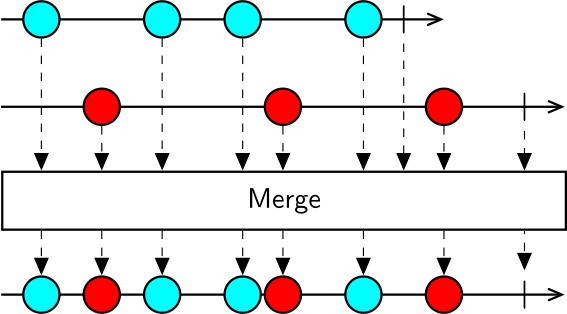
The Merge operator allows you to combine the output of multiple sequences of the same type into a single sequence. Merge subscribes to all source sequences in parallel and emits all the elements from each sequence downstream.
The resulting sequence will terminate successfully only when all source sequences have terminated successfully, or exceptionally as soon as any sequence produces an error.
Higher-order operator
Merge also works as a higher-order operator, so it can take as input a sequence of observable sequences. In this case, it will subscribe to all source sequences as soon as they are emitted by the outer sequence, and emit all elements from each sequence downstream.
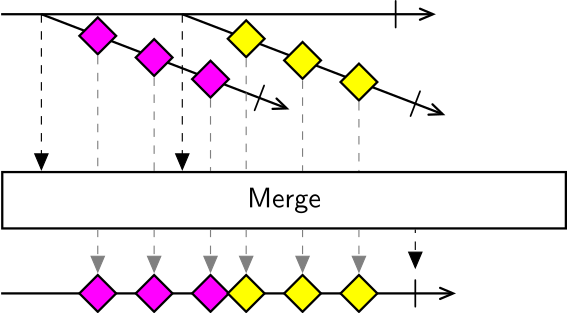
The higher-order variant is useful to combine notifications from multiple event sources running in parallel, for example when waiting for the first event from multiple input conditionals, or when logging data from multiple sources to the same file.
Examples
Use Merge to combine the output of two or more sequences together into a single sequence.
Input Aggregation
Use Merge to combine responses generated from processing different inputs (e.g. button presses).
Note
This example requires the Bonsai.Windows.Input package to be installed.
Related Operators
Use Zip, WithLatestFrom or CombineLatest if you want to combine sequences but keep the output separate.
Use Concat if you want to combine sequences sequentially.