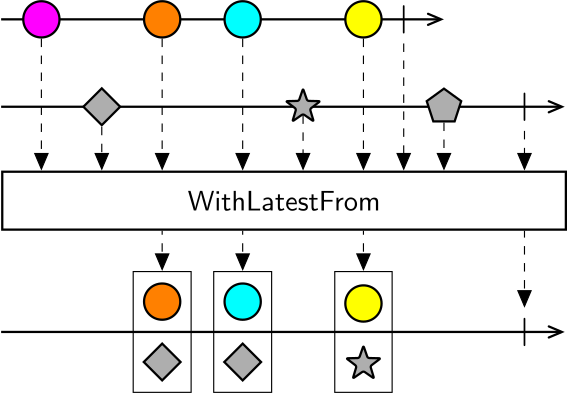
The behavior of WithLatestFrom is very similar to CombineLatest, but while CombineLatest emits a combined value whenever any of the source sequences emits a value, WithLatestFrom only emits the combination when the first sequence emits a value (as long as the second sequence has emitted at least one value).
Examples
Use WithLatestFrom to combine two sources in time.
Video Synchronization
Use WithLatestFrom to combine two sources (e.g. frames from different cameras, or the closest frame to a key press).
Note
This example requires the Bonsai.Vision and Bonsai.Vision.Design packages to be installed.
Background Subtraction
Use WithLatestFrom to combine a source with a reference value for post-processing (e.g. background subtraction).
Note
This example requires the Bonsai.Vision and Bonsai.Vision.Design packages to be installed.
Related Operators
Use CombineLatest to combine sequences if:
- You have more than two sources
- Need a higher-order operator
- Need to keep all the values from all the sources